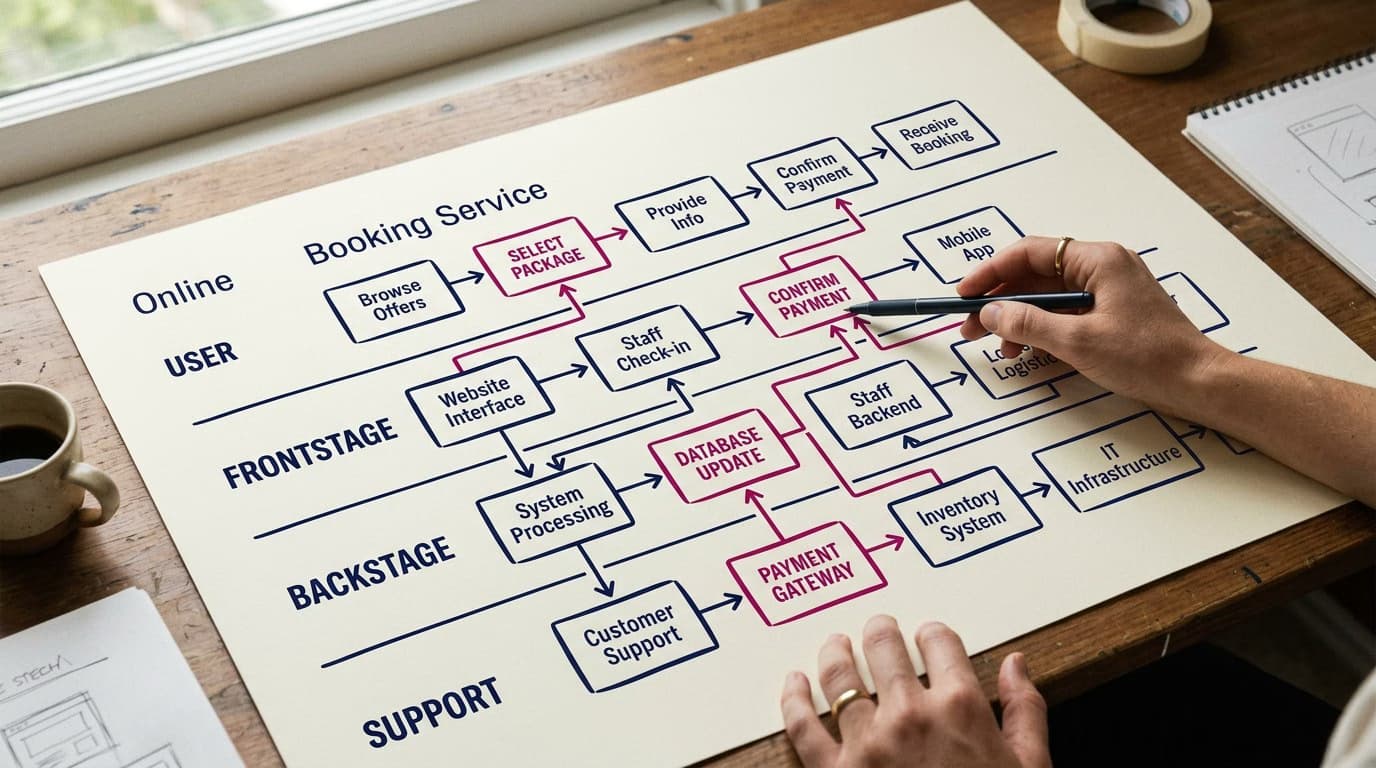
The service blueprint is one of the most powerful tools in service design. It's a diagram that visualizes not just what a user does during a service experience (like a customer journey map), but also everything that happens behind the scenes—the backstage processes, the internal systems, and the employee actions that are invisible to the customer.
It was introduced in 1984 by G. Lynn Shostack in a landmark Harvard Business Review article and has since become the standard for designing complex services: hotels, banks, hospitals, and—increasingly—digital products with a strong service component (like Uber, Airbnb, and Slack).
What Is a Service Blueprint
A service blueprint is a diagram that uses swimlanes where rows (lanes) represent different levels of interaction, and columns represent the chronological stages of the service. Each cell contains an action, a system, or a touchpoint.
The five standard swimlanes, from top to bottom, are:
- Customer Actions: What the customer does at each stage (e.g., "books online," "arrives at the hotel," "checks in").
- Frontstage Actions: What employees visible to the customer do (e.g., "greets the guest," "hands over the key," "explains the amenities").
- Backstage Actions: What employees who are not visible to the customer do (e.g., "prepares the room," "verifies the payment," "updates the reservation").
- Support Processes: The systems and procedures that enable everything (e.g., Property Management System (PMS), payment gateways, cleaning software).
- Physical Evidence: All the tangible or digital elements the customer encounters (e.g., website, confirmation email, key card, hotel lobby).
Between Customer Actions and Frontstage Actions is the line of interaction. Between Frontstage and Backstage Actions is the line of visibility. These are critical dividers in the blueprint: everything below the line of visibility is invisible to the customer but essential for service quality.

When to Use a Service Blueprint
A service blueprint is especially useful in three key scenarios:
1. Designing a new service. Before launching a service (e.g., a new client onboarding process for a bank), a blueprint forces you to map out all the roles and processes that need to be coordinated.
2. Diagnosing a flawed existing service. When metrics like NPS are low but the root cause is unclear, blueprinting the current service can reveal invisible disconnects (e.g., a front-desk employee gives a customer wrong information because they can't see the status of a backend process).
3. Optimizing a complex digital-physical service. For SaaS products with hardware or human operations (e.g., a food delivery service like DoorDash), a blueprint shows where the handoffs between digital and physical interactions create friction.
How to Create a Service Blueprint in 6 Steps
Step 1: Scope the Service and Customer. Be specific. For example: "A business traveler, who booked online three days prior, checking into a boutique hotel in New York." The more specific the scenario, the more effective the blueprint.
Step 2: Map the Customer Actions. Start with the top lane: what does the customer do at each stage? This typically involves 5-10 chronological phases (e.g., Awareness, Consideration, Booking, Pre-Arrival, Arrival, Stay, Departure, Post-Stay).
Step 3: Add Frontstage Actions. For each customer action, who is the visible employee and what do they do? Fill in this lane.
Step 4: Add Backstage Actions. What happens behind the scenes? Which employees, invisible to the customer, are working to support the experience?
Step 5: Map the Support Processes. What IT systems, software, and standard procedures support the frontstage and backstage actions? Examples include the PMS, CRM, payment gateways, RPA bots, and internal phone systems.
Step 6: Add Physical Evidence. For each stage, what tangible elements (digital or physical) does the customer see? This includes emails, SMS notifications, key cards, receipts, and the layout of the reception area.
A full blueprinting session for an average service requires a 4-8 hour workshop with a cross-functional team (designers, operations, IT, customer success, marketing). The result is a large poster, a PDF, and—most importantly—team alignment.
Real-World Service Blueprint Examples
Boutique Hotel vs. Airbnb
A comparative blueprint of a traditional hotel check-in versus an Airbnb check-in reveals how Airbnb replaces dozens of human backstage actions (room prep, key management, payment confirmation) with automation. The host manages cleaning, the guest gets instructions via the app, and payment is pre-authorized. This results in lower operational costs but creates different lines of interaction and visibility.
Hospital — Outpatient Visit
Blueprinting a specialist visit can reveal points where a patient waits without knowing why (frontstage = "silent waiting," backstage = the doctor is consulting with other specialists). A common solution identified through blueprinting is to add proactive communication to the frontstage to explain what's happening.
SaaS B2B — New Client Onboarding
For a B2B SaaS product like Salesforce, the onboarding blueprint shows how the customer-facing experience (signup, in-app tutorials, initial support) connects to backstage actions (a dedicated Customer Success Manager (CSM) being assigned, internal tickets being created, integration with the client's systems). It often reveals that the customer lacks context because the CSM isn't informed of the customer's status in real-time.
Service Blueprint vs. Customer Journey Map
This is a common point of confusion. Here's the difference:
- The customer journey map focuses only on what the customer does, thinks, and feels during an experience. It is customer-centric.
- The service blueprint shows customer actions plus everything that supports them. It is system-centric.
The journey map is essentially a subset of the blueprint. For purely digital projects (like a landing page), a journey map is often sufficient. For multichannel service projects (banking, hospitality, healthcare), you need a full service blueprint.
Recommended Tools for Blueprinting
- Miro: Offers excellent official templates (search for "service blueprint"). Best for remote workshops.
- FigJam: Integrated with Figma, which is convenient if your design team already uses it. Great community templates are available.
- Smaply: A specialized service design tool with dedicated blueprinting features. It's powerful but can be expensive.
- Excel/Google Sheets: Works for simple blueprints. Not visually appealing, but functional.
Frequently Asked Questions (FAQ)
How long does it take to build a complete service blueprint?
For an average service (5-7 stages), plan for a one-day (6-8 hour) workshop with a cross-functional team. For highly complex services (like a full-stack bank or hospital system), it could take 2-3 days spread over a couple of weeks.
Is it useful for a small business?
Yes, if the service involves multiple roles. For a solo freelance designer, it's overkill. But for a 5-person agency where a client interacts with a UI designer, project manager, and developer, a blueprint can reveal internal communication gaps.
How often should you update a service blueprint?
Update it whenever a major backstage system changes (e.g., a new CRM is implemented) or when key metrics like NPS drop for specific service stages. A blueprint is not a "build once, forget" document—it should be maintained like technical documentation.
Is it useful for purely digital SaaS products?
Less so. For a SaaS product where customer service is entirely self-serve via chatbots, the blueprint flattens, and a more technical user flow or journey map might suffice. It becomes valuable when human-touch onboarding or customer success management is involved.
Can a junior designer create one?
Yes, but it's best to start by participating in a blueprinting workshop facilitated by someone more experienced. The value isn't just in drawing the diagram—it's in facilitating the cross-team conversation that the diagram enables.
Next Steps
The service blueprint is one of the most advanced techniques for a UX/Service Designer. To learn how to design complex interactions—from user flows and prototyping to design systems—the Interaction Design Course at CorsoUX covers 8 chapters with 50 lessons and 1:1 mentoring. To also master the upstream research, consider the Complete UX Design Course, which includes both research and interaction design.
For more on mapping tools, read our guides on how to build a customer journey map and how to define user personas.