An empathy map is a visual tool that organizes everything we know about a user across four dimensions: what they say, think, do, and feel. It originated in the strategic marketing world (created by Dave Gray of XPLANE) and has become a standard tool in UX research kits because it's simple, quick to build, and forces the team to empathize with data, not opinions.
In this article, we'll cover what an empathy map is, how to create one correctly, when to use it in the design process, common mistakes to avoid, and a ready-to-use Figma template.
What Is an Empathy Map?
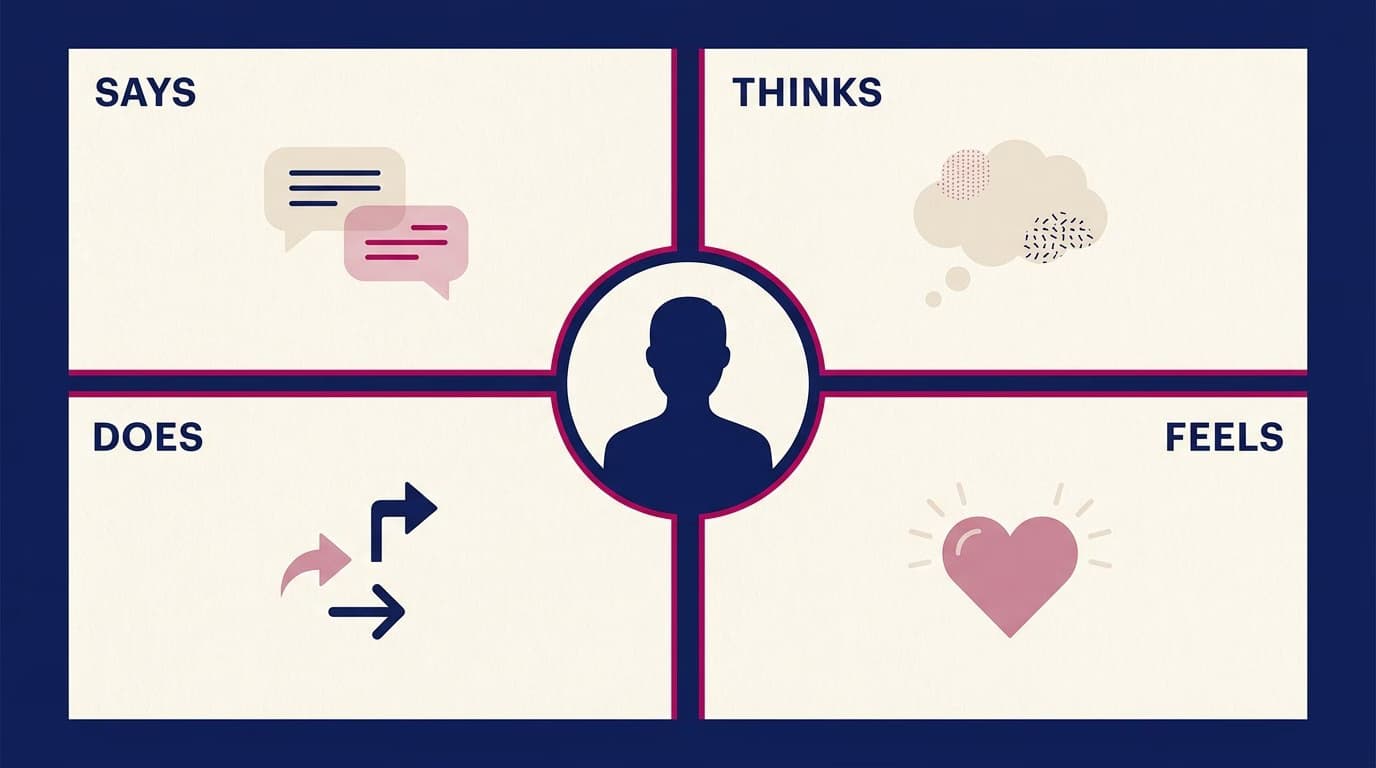
An empathy map is a four-quadrant visual chart centered on a single person (a real user, not a generic persona). The quadrants represent four perspectives on the same user:
- Says: Direct quotes gathered from interviews or observation sessions. For example, "I don't understand why the checkout button isn't here."
- Thinks: Hypotheses about what the user is thinking but not saying. This often includes unspoken doubts, fears, or frustrations.
- Does: Observed behaviors. How they use the product, where they click, where they drop off.
- Feels: Evident emotions. Frustration, relief, excitement, confusion.
The real value isn't in the quadrants themselves—it's in the intersections. Comparing 'Says' and 'Does' reveals telling inconsistencies (a user says they love the site but abandons it after 30 seconds). Comparing 'Thinks' and 'Feels' uncovers the emotions hidden behind surface-level rationalizations.

When to Use an Empathy Map
An empathy map is particularly effective at three specific moments in the design process:
After User Interviews, Before Personas
This is the most common use case. You've conducted 5-8 user interviews, you have transcripts full of raw data, and you need to synthesize it. Building an empathy map for each interviewee (or for each distinct segment) before consolidating them into personas helps you avoid losing important details in the summary.
At Project Kickoff to Align the Team
In a multidisciplinary project kickoff (with designers, product managers, developers, and marketers), filling out an empathy map together for a specific target user forces the team to start from a shared understanding. You often discover that everyone had a slightly different user in mind.
After Usability Tests to Identify Friction
Usability tests generate a lot of data. Mapping the reactions of a critical participant (e.g., the one who struggled the most) onto an empathy map highlights where and why the product is creating friction.
How to Create an Empathy Map: Step-by-Step
An empathy map is always built in collaborative sessions of 30-45 minutes, not alone. Here's the workflow we use in real projects:
Step 1 — Define the specific user. Not 'our customers,' but 'Sarah, 34, a project manager at a San Francisco tech startup who tried our product for the first time on Monday.' The more specific, the better.
Step 2 — Gather the raw data. Interview transcripts, session recordings, support tickets, reviews from sites like G2 or Capterra. An empathy map isn't built from scratch—it synthesizes existing research.
Step 3 — Fill in the Says quadrant. Extract 5-8 direct quotes from the user. Use their exact words. No paraphrasing.
Step 4 — Fill in the Does quadrant. Note 4-6 observed behaviors. Use active verbs: 'scrolls quickly,' 'abandons the signup form,' 'clicks the logo to return home.'
Step 5 — Infer Thinks and Feels. These two quadrants are interpretive, not observational. Work in pairs: one person suggests a hypothesis, and the partner must find supporting evidence in the data. If there's no evidence, mark the hypothesis as such (e.g., with a question mark).
Step 6 — Look for inconsistencies. Compare the quadrants. Where do words not match actions? Where do thoughts betray emotions? These inconsistencies are the real output of the session.
The 4 Most Common Mistakes
Poorly made empathy maps become pretty but useless posters. The most frequent mistakes are:
1. Basing the map on 'team intuition' instead of data. 'Our user probably thinks...' without evidence is marketing speak, not research. If you haven't done interviews, you can't create a valid empathy map—you need real research first.
2. Generalizing about the 'average user.' If you fill the Says quadrant with phrases like 'wants a simpler experience,' you're generalizing. The power of an empathy map lies in its specificity.
3. Confusing Thinks with Says. The Says quadrant should only contain direct quotes. Anything inferred goes into Thinks or Feels.
4. Creating the map with no follow-up. Building the map is 30% of the value. The other 70% is what you do with it. Identify 2-3 actionable insights to carry into the design phase.
Empathy Map vs. Personas vs. Journey Maps
These three tools are often confused. Here's the difference:
An empathy map is an emotional snapshot of a single user at a specific moment. A persona is an aggregated archetype of a user segment, complete with demographics, motivations, and high-level needs. A customer journey map is a timeline that shows how a user moves through an experience over time.
In the process, the typical flow is: empathy map → personas → journey map. Each step becomes more abstract and strategic.
Templates and Recommended Tools
For visual consistency and team sharing, one of the following tools works better than a blank canvas:
- Figma / FigJam: The most popular choice. Search for 'empathy map template' in the Figma Community, and you'll find dozens of ready-made options. Our favorite is the one adapted from Dave Gray's original.
- Miro: Has excellent official templates. Great for remote workshops.
- Mural: A strong alternative to Miro with a similar feature set.
- Whiteboard and sticky notes: Old school, but it works perfectly for in-person workshops.
Frequently Asked Questions
How many empathy maps should I create per project?
Typically 3-5—one for each interviewed user who represents a distinct archetype. More than five becomes difficult to manage and loses the specificity that gives this tool its value.
What if the team disagrees on the Thinks and Feels quadrants?
That's healthy. It means you're using the tool correctly—it forces different assumptions out into the open. When this happens, note both interpretations and look for clarifying evidence in subsequent research. The disagreement often reveals the need for another interview.
Can I create an empathy map without access to real users?
Technically, yes, by using proxy data (public reviews, social listening, support tickets), but the result is significantly weaker. Consider a 'proxy' empathy map a starting point to be validated with real interviews as soon as possible.
How long does an empathy mapping session take?
About 30-45 minutes for the initial creation of one map with a team of 3-5 people. Add another 15-20 minutes for a final discussion to extract actionable insights. If the session takes longer than an hour, you're likely over-generalizing.
Is this tool useful for junior UX designers?
Especially. For designers just starting out, the empathy map is one of the few tools where value is delivered almost immediately. The margin for error is low: even an imperfect version will spark richer team conversations than having none at all.
Next Steps
The empathy map is just one of many tools in the UX research toolkit. To learn how to conduct user research in a structured way—from interviews and testing to analysis and synthesis—the User Research Course by CorsoUX includes 9 practical chapters with 62 lessons and 1:1 mentorship to review your work. You can try the first lessons for free with no credit card required.
If you're looking for an end-to-end program (research + interaction + visual + writing), the Complete UX Design Course includes the full bundle. To learn about other research techniques, read our guides on how to create user personas and how to design a customer journey map.