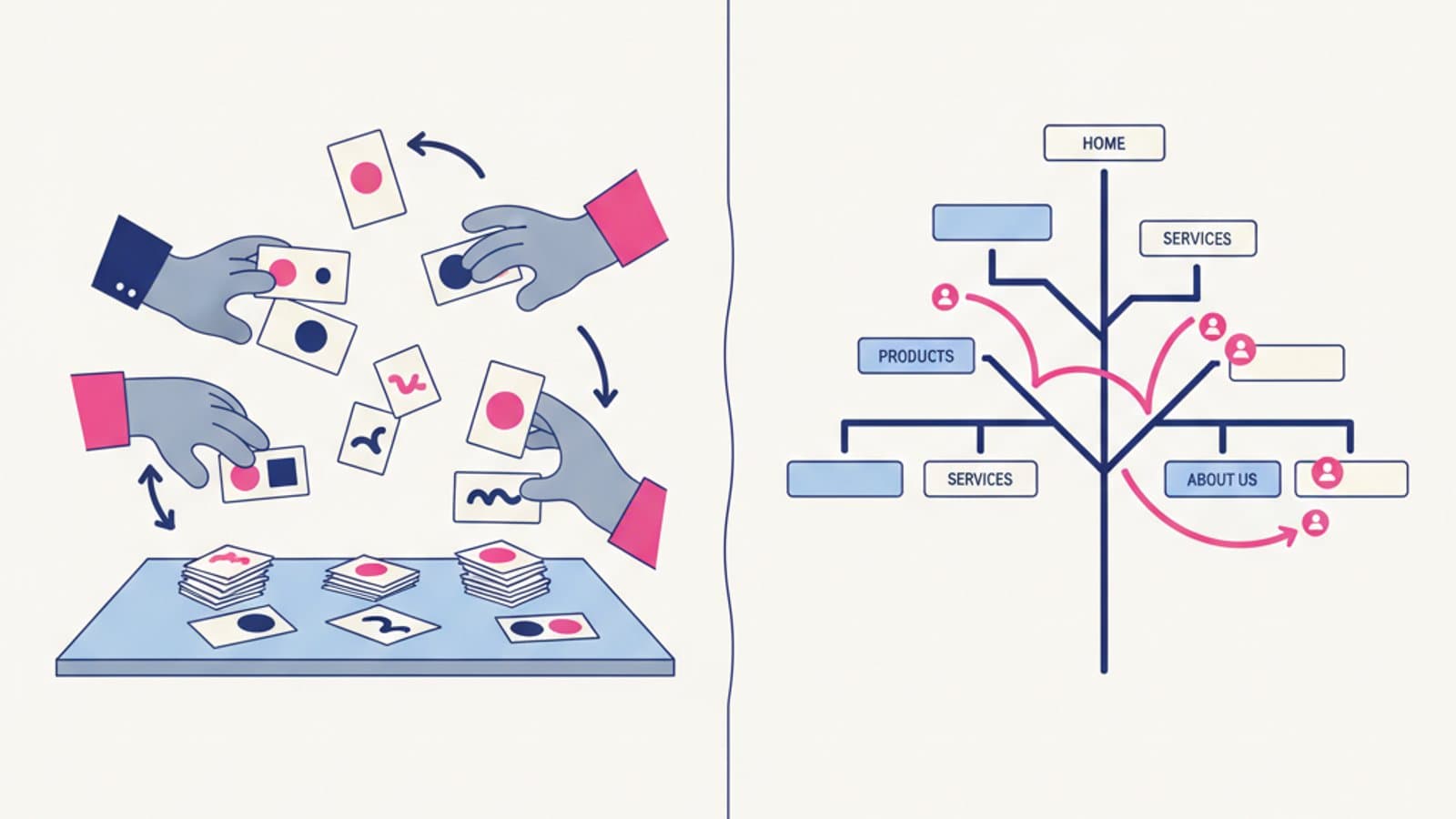
When you're designing a navigation structure or content hierarchy, two crucial questions arise: "Does my menu reflect how users think?" and "Can they find what they're looking for?" To answer these, designers use two simple yet powerful techniques: card sorting and tree testing.
They are complementary methods. Card sorting tells you how users would group your content. Tree testing tells you if they can find it within the structure you've designed. Together, they form the one-two punch of information architecture: one method to build it, the other to validate it.
This guide covers everything you need to use both methods in your projects: the different types, when to use them, how many participants you need, the best tools, and how to interpret the results to make confident decisions.
What you'll learn in this guide:
- What card sorting is and its 3 variations (open, closed, and hybrid)
- What tree testing is and how it differs
- How many participants you need for statistically significant results
- The best tools (OptimalSort, Maze, Treejack) with pros and cons
- How to interpret results and make informed navigation changes
- Concrete examples with real-world outputs
- Common mistakes in IA projects
What Is Card Sorting?
Card sorting is a research technique where you show users a set of "cards"—each representing a piece of content or a feature—and ask them to group them into categories that make sense to them. You run this with 15-30 users and analyze the patterns to understand how users would naturally organize your content.
It's one of the oldest methods in UX (Donna Spencer wrote the definitive book, "Card Sorting: Designing Usable Categories," back in 2009) and one of the most underrated by modern teams. Too many navigation redesigns skip this step, designing menus based on a designer's intuition or stakeholder opinions. This often produces structures that are clear to the internal team but confusing to users.
The 3 Variations of Card Sorting
1. Open card sort
The user sees the cards (e.g., "UX Design Course," "Figma Course," "Blog," "Testimonials," "Contact," "Pricing," "Student Area"...) and must group them as they see fit, inventing the category labels themselves.
- When to use it: When you don't have a structure yet and want to understand how users would organize everything from scratch.
- Output: Recurring grouping patterns + suggestions for category names.
- Time per participant: 15-30 minutes.
2. Closed card sort
You show the cards and the predefined categories. The user can only assign each card to an existing category. This is useful when you've already decided on the high-level structure and want to validate where specific items belong.
- When to use it: You've already defined the main categories and only want to test the content distribution.
- Output: Percentage of agreement on where to place each card.
- Time per participant: 10-20 minutes.
3. Hybrid card sort
A middle ground: you present some fixed categories but allow the user to create new ones if they feel it's necessary. It's the most flexible but also the most complex to analyze.
- When to use it: You have a partial structure and want to both validate and discover.
- Output: Validation + new insights.
- Time per participant: 20-30 minutes.
How to Conduct a Card Sort
Step 1 — Prepare your set of cards
Choose 30-80 items that represent the content or features of your product. Too few (< 20) and significant patterns won't emerge. Too many (> 100) will fatigue users.
Step 2 — Choose your method (in-person or remote)
In-person: Use sticky notes on a table. It's slower but great for observing users' thought processes. Remote: Use tools like OptimalSort, Maze, or UserZoom. They're scalable, offer automatic analysis, and are more cost-effective.
Step 3 — Recruit 15-30 participants
For a remote card sort, 15 participants are sufficient to see the main patterns emerge. More than 30 adds statistical noise without much additional insight (Tullis & Wood, 2004 — a seminal study on participant numbers).
Step 4 — Provide clear instructions
"You will see X items that represent content from our website. Please group them into categories that make sense to you. You can create as many categories as you like and name them whatever you prefer."
Step 5 — Analyze the results
For an open card sort, look at the similarity matrix: a grid showing how often any two cards were grouped together. Groups with high similarity are natural candidates for navigation categories.
For a closed card sort, look at the agreement percentage for each category. If 90% of users put "Pricing" under "About Us," the placement is solid. If only 40% did, you have a clarity problem.
What Is Tree Testing?
Tree testing (also called "reverse card sorting") is the opposite of card sorting: you provide a structure, and you ask users to find specific content within it. It validates whether the structure you've designed is understandable to people who aren't already familiar with it.
The term was coined by Donna Spencer and formalized as a methodology by the team at Optimal Workshop around 2010. Today, it's the standard validation method for any serious navigation redesign.
How a Tree Test Works
You show users only the hierarchical structure (no visual design, no distractions, just text), then give them 5-10 specific tasks like:
- "Where would you look for information about course pricing?"
- "How would you find the contact page?"
- "Where would you go to see student reviews?"
For each task, the user navigates the structure by clicking on categories until they find the right one (or give up). The system automatically measures:
- Success rate: How many people found the content.
- Direct path: How many went straight there without backtracking.
- Time to answer: How long it took them.
How to Interpret the Results
The 3 key indicators of a tree test:
| Metric | Optimal Value | Problematic Value |
|---|---|---|
| Success rate | > 80% | < 60% |
| Direct path | > 60% | < 40% |
| Time to answer | < 20 seconds | > 60 seconds |
A task with a 45% success rate is a clear sign that the current categorization is confusing. A task with a 90% success rate but a 30% direct path means users find the content eventually but get lost along the way—the category labels are ambiguous.
When to Use Tree Testing
- Before launching a navigation redesign: to validate that the new structure is understandable.
- After a card sort: use card sorting to design the structure, then tree testing to validate it.
- When there's internal conflict over navigation: an objective test ends the debate.
- As a regression test: after adding new categories, verify they haven't broken the existing structure.
Tools for Card Sorting and Tree Testing
OptimalSort / Optimal Workshop (The Gold Standard)
OptimalSort and Treejack from Optimal Workshop are the industry standard. They are dedicated tools with advanced statistical analysis, similarity matrices, dendrograms, and automatic visualizations.
- Cost: From ~$109/month
- When to choose: Professional projects that require rigorous statistical analysis.
Maze
Maze added card sorting and tree testing to its toolset in 2023. It's less advanced than Optimal Workshop but is integrated with usability tests, surveys, and other methods.
- Cost: From ~$75/month
- When to choose: If you already use Maze for other tests, it's a convenient integration.
UsabilityHub / Lyssna
A more affordable platform with basic tree testing and card sorting features.
- Cost: From ~$49/month
- When to choose: For limited budgets or occasional testing.
In-Person Method
For in-person card sorting with users, all you need are sticky notes and a table. The disadvantage is scalability: it's hard to bring 20 people into the office.
The hidden advantage of the in-person method: You get to observe users' think-aloud process as they group items. The qualitative insights are often richer than the quantitative data.
How Many Participants Do You Really Need?
This is the most common question about these methods. The most authoritative answer comes from Tullis and Wood (2004), who studied the correlation between the number of participants and the stability of card sorting results:
- 5 participants: 20% reliability — too few
- 15 participants: 75% reliability — reasonable
- 30 participants: 90% reliability — excellent
- 50+ participants: marginal gains, not worth the cost
For tree testing, Jeff Sauro of MeasuringU suggests:
- To compare 2 structures: at least 40 participants per group.
- To validate a single structure: 25-30 participants.
- For rapid iteration: 15 participants are enough to identify major issues.
The rule of thumb: 15 participants is the minimum for usable results. 30 gives you statistical confidence. Over 50 is a waste of budget.
Real-World Examples
Example 1: E-commerce Card Sort
A fashion e-commerce site wanted to reorganize its main menu. It ran an open card sort with 20 participants using 45 cards (clothing items and potential categories).
Result: The team had planned a structure based on "season" (Summer/Winter). Users, however, organized it by "occasion" (Work, Casual, Activewear). The top three categories were Work (35% of cards), Casual (30%), and Activewear (20%).
Action: The team abandoned the seasonal structure and adopted the occasion-based categorization. The conversion rate from site search increased by 22% after the redesign.
Example 2: Online Bank Tree Test
An online bank tested two menu structures with a tree test involving 80 participants (40 per structure).
- Structure A (current): 8 top-level categories
- Structure B (new): 5 top-level categories with better grouping
Results across 7 tasks:
- Structure A: 62% average success rate, 41% direct path
- Structure B: 84% average success rate, 67% direct path
Action: The bank adopted Structure B. The objective data ended a 6-month internal debate.
Example 3: Online Course Card Sort
An online course platform ran a closed card sort with 25 participants to decide if "Practice Exercises" should be under "Course" or "Resources."
Result: 87% of participants placed it under "Course." The hypothesis was confirmed with zero ambiguity.
Action: The decision was made in a 15-minute meeting. The cost of the card sort ($200 for the participant panel) saved weeks of opinion-based arguments.
Common Mistakes to Avoid
- Using only card sorting without a tree test. Card sorting tells you how users think they would organize things, but a structure that seems optimal in a card sort can still fail a tree test if the category labels are ambiguous.
- Too few participants. Five people in a card sort provides anecdotal evidence, not statistical patterns. Always aim for at least 15.
- Using cards that are too abstract. "Company Philosophy" or "Our Values" are hard to place. Stick to concrete items tied to real user tasks.
- Ignoring user-suggested categories. In an open sort, the names users give to their categories are invaluable—often better than what the team had in mind.
- Mixing junior and senior users without segmenting. In B2B products, a senior HR manager has a very different mental model from a junior recruiter. Analyze their results separately when possible.
- Skipping task context. For tree testing, tasks must be realistic (similar to what users actually do), not academic exercises.
Frequently Asked Questions
Is card sorting the same as affinity mapping?
No. Card sorting involves external users organizing a product's content. Affinity mapping is an internal team activity for grouping insights from prior research. They both might use sticky notes, but for entirely different purposes.
Does card sorting work for B2B projects?
Yes, but with a few caveats. In B2B, a user's mental model heavily depends on their role. If possible, segment your card sort by role (e.g., 10 buyers + 10 end-users) and analyze the results separately. You'll often find two distinct mental models that may require different navigation paths.
Can I just do card sorting with my internal team?
No. The value of card sorting is understanding the mental model of people who don't know the product like you do. Doing a card sort with your team only validates your internal assumptions, which is the opposite of the goal. Always use external participants who are not on the product team.
How much does a recruited card sort cost?
Using platforms like UserInterviews or Respondent, recruiting 20 participants costs between $500 and $1,000 (depending on the target audience—B2B is more expensive). The tool (like OptimalSort) adds ~$109/month. A complete project typically costs $700-$1,500 all-in. This is far less than the cost of launching a redesign with the wrong structure.
Does tree testing work without any visual design?
Yes, and that's its key feature. Tree testing isolates the labeling structure from visual distractions. A user navigating with text alone tells you if the taxonomy works. If you add graphics, you're confounding the test of the text with a test of the visuals. Text-only is the method's strength.
Next Steps
Card sorting and tree testing are among the user research methods with the best ROI in the industry: 2-3 days of work, $600-$1,200 in costs, and navigation decisions based on objective data that prevent costly redesigns.
The comprehensive UX Design course from CorsoUX includes a practical module on information architecture with hands-on card sorting and tree testing projects. You'll simulate recruiting, conduct tests, analyze results, and present recommendations. By the end, you'll know how to manage the end-to-end validation of a navigation structure.
To learn more:
- Information Architecture — the broader IA framework
- The guide to user research — other UX research methods
- UX Audit checklist — where to check your existing IA
- Customer Journey Map — a complement for understanding how users interact with your structure