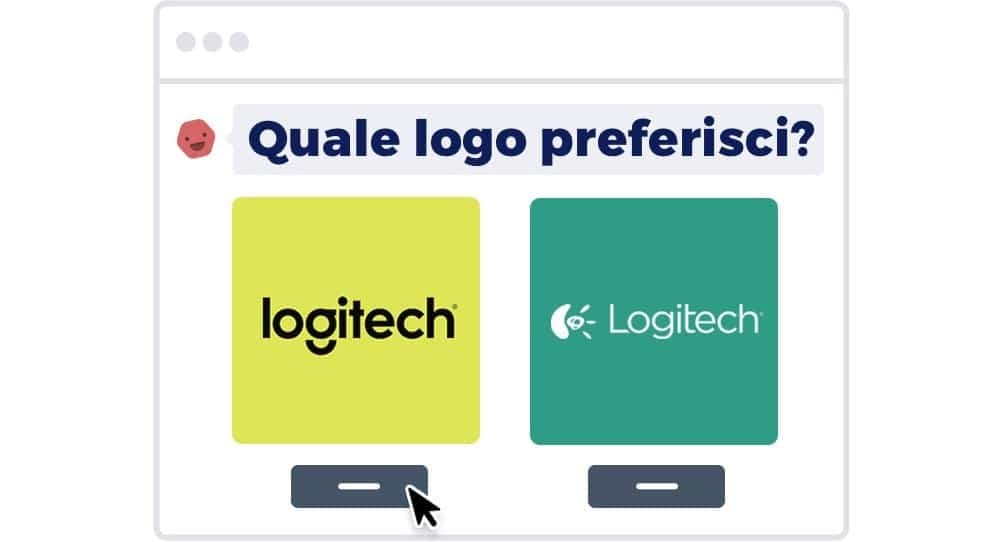
"Which of the two versions do you like more?" It's the simplest question in the design world, and exactly that is why preference testing is one of the most-used — and most often misused — user research methods. When it works, it's fast, cheap, and generates strong hypotheses. When it fails, it produces decisions based on shallow opinions that have nothing to do with real user behavior.
This article explains what a preference test is, when it makes sense to use one, how to run it so you get reliable results, and — most importantly — when you should pick a different method instead.
What you'll learn:
- What a preference test really is (and what it isn't)
- The 3 scenarios where it's the right method
- The 4 scenarios where it's the wrong method (and what to use instead)
- How to run a preference test in 5 steps
- The framing mistakes that lead to bad decisions
What a preference test is
A preference test is a user research method where you show a sample of users two or more variants of something — a landing page, a logo, an icon, a headline, a flow — and ask which one they prefer and why. The output is a subjective signal: which variant most of the sample prefers, and the stated reasons behind that preference.
It's a hybrid qualitative-quantitative method: the "which do you prefer" produces a number (X% prefer A) and the "why" produces rich text.
It's clearly different from other methods:
- From moderated usability testing, because you don't measure behavior during a task — you only ask for a final opinion.
- From a behavioral A/B test, because you don't measure real conversions or actions — you capture stated preference.
- From an in-depth interview, because it's focused on a specific artifact and doesn't explore broader needs or context.
Preference testing lives in a precise space: it tells you what people say they prefer when you put it in front of them. Which is not always the same as "what actually works" — and that's where 90% of the problems begin.
When preference testing is the right method
Three situations where it works well.
1. Pure color, type, and stylistic choices
When you're choosing between two palettes, two heading fonts, two illustration styles, two visual directions — and the difference is purely aesthetic or brand-related rather than functional — preference testing is fast and effective. "Which do you like more" in these cases often coincides with which will communicate the brand values better.
A typical example: "Which of these three homepage layouts most matches the tone of a brand positioning itself as premium?" That's a legitimate preference test question.
2. Generating hypotheses before a behavioral test
Before you invest weeks in an A/B test with real traffic, a quick preference test on 30–50 people can help you eliminate the clearly weaker variants and focus your A/B test only on the 2 that looked competitive. It's a cheap, fast pre-test filter.
3. Decisions with very slow feedback cycles
Some changes have incredibly slow feedback loops: the cover image of an annual report, the design of a digital package, the style of an email that goes out once a month. In those cases an A/B test would take months to hit significance, and a preference test is the only practical alternative.
When preference testing is the wrong method
Four situations where it produces misleading decisions.
1. Flow and interaction design
"Which of these two checkout flows looks better to you?" is the wrong question. People are bad at predicting which design will actually help them complete an action — see the classic Don Norman and Jakob Nielsen literature on this. A checkout flow should be tested with a usability test: give the task "buy this t-shirt", watch what happens, don't ask for opinions.
2. Performance or efficiency estimates
"Does this dashboard feel faster to read?" People don't have reliable intuition about cognitive processing speed. A dashboard can feel "clearer" but take 40% longer to find a specific piece of information. You need a timed task-based test, not a preference.
3. New vs. familiar features
If you ask "do you prefer the old layout or this new one?", 9 times out of 10 the old one wins — not because it's better, but because it's familiar. The familiarity effect in a preference test is enormous and almost always underestimated.
4. Decisions that depend on real usage context
"Which of these three onboarding modes do you prefer?" seen cold is very different from "which of these three would have helped you when you started using the product last night at 11pm trying to figure out how it worked". Context changes everything. If the design depends on context, test it in context — ideally with an unmoderated remote usability test.
How to run a preference test in 5 steps
Step 1: define the research question
Not "which variant do you prefer" — too generic. You need to define the criterion: aesthetic preference? perceived trustworthiness? clarity? One question per test.
Good example: "Of these two versions of the homepage, which feels more professional and trustworthy for a digital bank?" You have a criterion (professional + trustworthy) and a context (digital bank).
Step 2: prepare the variants
- Two or three variants, never more. Beyond three, participants' cognitive capacity to compare them drops sharply.
- Variants with meaningful differences. If variants are too similar, the test produces no signal.
- Neutral presentation. Don't label them "variant A / variant B": assign random letters or numbers so order doesn't influence judgment.
Step 3: choose the sample
For online preference tests, 25–50 participants are enough for an initial signal. For important decisions, go up to 100–150. Beyond that threshold, additional participants offer diminishing returns.
Recruiting: participants have to belong to the target segment. A preference test on a digital bank's homepage is not run with designer friends — it's run with people in the target audience (banked, specific age/income bracket, digitally literate). In the US, User Interviews and Respondent.io are the go-to panels; Prolific covers both the US and the UK well.
Step 4: write the questions
The classic preference test sequence:
- First impression: "Which version stands out more to you? Why?"
- Specific criterion: "Which version feels more [professional / clear / trustworthy / modern]? Why?"
- Use scenario: "If you had to use this product for [specific task], which version would you pick? Why?"
- Open question: "Is there anything else you want to flag about either version?"
The answers to the "why" are more valuable than the raw "which" statistic. The why tells you what drives preference — and you can reuse that to improve the design further.
Step 5: analyze results and context
- Count preferences per variant. 70/30 is clear; 55/45 is inconclusive.
- Read every "why" and cluster them by theme (qualitative clustering).
- Compare the reasons: are the people who prefer A doing so for rational reasons (aligned with your goals) or emotional ones (that might change in 3 months)?
- Look for segment patterns: sometimes A is popular with younger users and B with older ones. If your product is multi-segment, that information is decisive.
Tools for running preference tests
In 2026 the most used tools for unmoderated remote preference testing:
- Maze — has a dedicated "preference test" mode, ideal for designers who work in Figma and want to import prototypes directly.
- Lyssna (formerly UsabilityHub) — one of the longest-running tools specifically for preference tests, first-click tests, and five-second tests. Approachable pricing.
- UserZoom — enterprise-grade research platform widely used inside US Fortune 500 design teams.
- UserTesting — strong integrated recruiting panel across the US and UK.
- Typeform + manual recruiting — the cheapest route: build a questionnaire, add images, share the link with your target.
The typical cost of a preference test with 50 panel-recruited participants is $150–$400 in the US or £120–£300 in the UK.
The most common framing mistakes
Five traps that invalidate preference tests even when the method is applied correctly.
1. Primacy/recency effect
The order in which variants are presented affects judgment. People tend to remember the first and the last better — and to prefer what they remember best. Fix: randomize order for each participant.
2. Leading question
"Do you think version B, with the elegant new font, is more refined?" Positive adjectives in the question induce positive answers. Fix: neutral questions with no loaded adjectives.
3. Designer sample
A preference test run on other designers (coworkers, communities, social) produces preferences that reflect professional taste in the industry, not your actual users. Fix: always recruit from the real target.
4. Too much exposure
Showing variants for too long gives room for post-hoc rationalization. First impressions — 3–5 seconds — are often more predictive. Fix: for some tests, use a "first-click test" or "five-second test" instead of an open preference test.
5. Treating it as definitive proof
The worst of all: a preference test is a signal, not a proof. Making $200K decisions based on a preference test with 30 people is an unjustified leap. Use preference testing as a qualitative filter, then validate with a behavioral A/B test.
Frequently asked questions
What's the difference between A/B testing and preference testing?
A/B testing measures real behavior: how many users actually click, buy, or sign up. Preference testing measures stated opinion: what people say they prefer when you show them the options. They're complementary but not interchangeable. A user can say "I prefer A" and then, faced with both in real life, convert better on B.
How many people do you need for a preference test?
25–50 for an initial signal, 100–150 for important decisions. Below 25, results are unreliable; above 150, each extra participant adds marginal value. The quality of recruiting (real target users) matters more than raw quantity.
Can I run a preference test internally with coworkers?
For a very early exploration, yes — as a warmup. For real decisions, no: coworkers are not your target, and they almost always reflect the team's taste, not the users'. Serious testing is done with real users recruited from the target segment.
Does preference testing work for UX writing decisions?
It only works for pure stylistic decisions (e.g. "serious tone vs friendly tone"). For clarity decisions ("is this button more understandable?"), a cloze test or a task-based usability test gives far more reliable results.
How long does a preference test take?
An unmoderated online test is completed by each participant in 5–10 minutes. Total data-collection time (via a panel provider) is typically 24–72 hours. Qualitative analysis adds 2–4 hours for a 50-person sample.
Next steps
Preference testing is one of the tools in a UX researcher's toolbox. Like any tool, it's great for the problems it's designed for and inadequate for the rest.
To see it in the full landscape:
- Read the complete user research guide to see every method available
- Compare it with A/B testing to understand when to pick a behavioral method
- Study unmoderated testing tools to see which platforms support each kind of test
In CorsoUX's User Research course, preference testing is one of the 7 core methods we teach, with hands-on exercises guided by mentors on real projects from US and UK product teams.