Information architecture (IA) is the invisible backbone of any digital product. It determines how content is organized, how users move between it, and how easily they find what they're looking for. It's one of the most underestimated disciplines in UX Design: when it's done well, you don't notice it; when it's done poorly, it's the reason a site makes you lose your patience.
This complete guide covers what information architecture is, how to build it step by step, which methods to use to validate it, the typical deliverables (sitemaps, user flows, taxonomies) and the modern tools for working on it in 2026.
What you'll learn:
- What information architecture really is
- The 10 qualities of effective IA (Morville's heuristics)
- The 4 systems that make up an IA: ontology, taxonomy, navigation, search
- How to run a content audit and a card sorting session
- How to create useful sitemaps and user flows
- The recommended tools in 2026
What is information architecture
Information architecture is the practice of organizing, structuring, and labeling the content of a digital product so that users can find it, understand it, and use it with ease. The original definition by Louis Rosenfeld and Peter Morville in their classic book Information Architecture for the World Wide Web remains the reference.
IA answers three key questions:
- Where am I? (orientation)
- Where can I go? (navigation)
- How do I find what I'm looking for? (findability)
If a user lands on a page of your product and can't answer these three questions in 3 seconds, your IA has a problem.
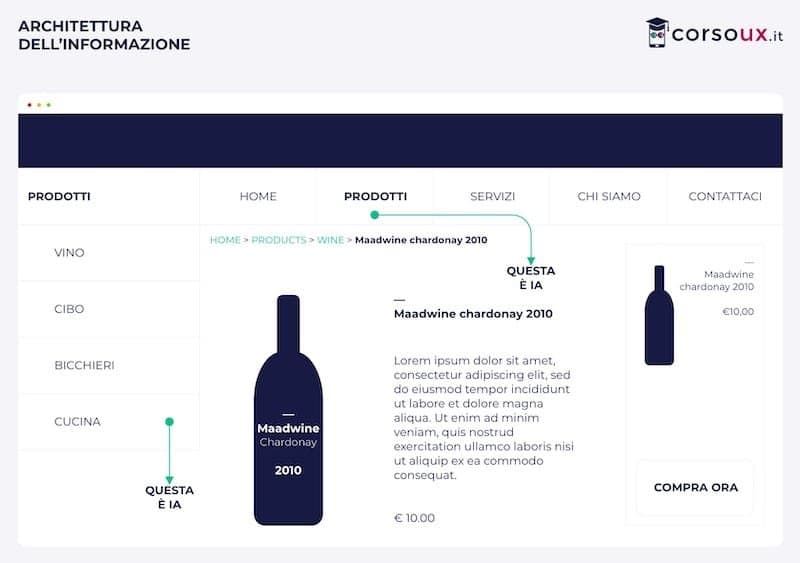
IA isn't just "putting the right items in the menu". It's a system that includes:
- How content is categorized
- How it's labeled (the language used)
- How it's linked together
- How it's searched
The 10 qualities of effective information architecture
Peter Morville codified the seven faces of user experience — often cited as IA heuristics. Over the years more qualities have been added. Here they are as an operational checklist:
1. Useful
Does the content actually serve someone? If no user needs a given section, don't add it "for completeness". IA improves when you remove, not only when you add.
2. Usable
Can the user actually navigate and find things? It's not enough for content to exist: it has to be reachable in a few clicks. The classic "3 clicks rule" is a myth, but the principle that users shouldn't need more than 3–5 steps for common actions still holds.
3. Findable
Do people who are looking for something find it? Findability is more than a search bar: it's the result of good labels, good hierarchies, and good internal cross-linking.
4. Credible
Is the content trustworthy? The way you organize information communicates authority or superficiality. A chaotic IA makes content feel less credible even if the content is identical.
5. Accessible
Can people with disabilities (motor, visual, cognitive) navigate? A menu with many nested levels, for example, is an obstacle for screen reader users. Accessibility must be part of IA from the start — and meeting WCAG 2.2, ADA, and Section 508 requirements isn't a retrofit, it's a design constraint from day one.
6. Desirable
Is the way information is presented pleasant and inviting? Desirability isn't just aesthetics: it's the result of an IA that respects the user's time and intelligence.
7. Valuable
Does the IA produce measurable value — more conversions, fewer support tickets, more productive time on the site? Good IA contributes directly to business KPIs.
8. Clear
Are the labels and categories understandable without a glossary? The language should belong to your users, not to the internal company jargon.
9. Consistent
The same things always called the same way; consistent navigation patterns throughout the product. Inconsistency is one of the main sources of confusion.
10. Controllable
Can the user go back, undo, modify their choices? A rigid IA that forces paths is less usable than one that allows free exploration.
The 4 systems of information architecture
Morville identifies four systems that every IA contains:
Ontology (language)
The vocabulary used to talk about the domain. What do we call things? "Cart", "basket", or "bag"? Ontology choices seem trivial but have a huge impact on findability. Ontology should come from real users — from their words, not the company's internal ones.
Taxonomy (classification)
How do we group things? Hierarchies (main categories → sub-categories), faceted classifications (parallel filters like on Amazon), relationships ("related" content). Taxonomy is the backbone; card sorting is the main method for building it.
Navigation (how to move around)
How does the user go from one point to another? Main menu, secondary menus, breadcrumbs, contextual links. Navigation is the visible face of taxonomy, but they don't coincide: you can have a complex taxonomy with simple navigation.
Search (explicit findability)
The internal search system, with its filters, suggestions, autocorrect, ranking. In complex products, search is often the main discovery channel — more than menu-based navigation.
Content audit: the inventory of content
Before you can organize content, you need to know what you have. A content audit is the systematic inventory of all the content in a product: pages, sections, micro-content, metadata.
How to run it
- Export the existing sitemap (if the product already exists) or crawl it with a tool like Screaming Frog.
- Build a table with one row per content item and columns for: URL/location, title, type, author, last modified date, status (current/outdated), incoming links, outgoing links, traffic metrics.
- Classify each item as: keep as-is, update, consolidate with others, delete.
- Analyze patterns: which content is popular? which is duplicated? which is orphaned (no incoming links)?
A content audit is tedious, painstaking work — but it's the foundation of any IA restructuring. Without it, you're guessing.
Card sorting: organizing content
Card sorting is the main method for understanding how real users would group your content. There are three variants:
Open
You give the user cards (physical or digital) with the names of the content items and ask them to group them freely, naming each group themselves. Useful at the start, when you don't yet have a taxonomy to validate.
Closed
You give the user the content cards and the predefined categories. You ask them to sort each item into the category they think fits best. Useful for validating a taxonomy you've already drafted.
Hybrid
Predefined categories but the user can create new ones if needed. It's a practical compromise and often the most informative.
How many participants
For reliable quantitative results: 30 participants minimum (classic study by Jakob Nielsen). For qualitative exploration: 10–15 are enough to see the main patterns.
Tools
Optimal Workshop is the gold standard for remote online card sorting. It allows open, closed, and hybrid tests with built-in analysis. Alternatives: Miro for moderated workshop card sorts, Maze for lighter tests.
Tree testing: validating a taxonomy
Tree testing is the complement to card sorting: instead of asking "how would you group these?", you ask "where would you find X in this structure?". You give the user a category tree (no visuals, just text) and a task ("where would you look for a product return policy?") and see whether they reach the correct destination.
It's the most efficient test for validating a taxonomy: it can be run unmoderated in 10 minutes and produces clear metrics (success rate, time, path taken).
Tool: Optimal Workshop offers "Treejack", the dedicated platform.
Sitemap: the big-picture view
A sitemap is the visual hierarchical representation of a product's content. It's not a wireframe: it's a map of "what's there and how it's organized".
How to build it
- One box per page or main section
- Connection lines to show hierarchy (parent-child)
- Annotations for content types, special states, external links
The sitemap helps the team align on the structure. It's also a valuable deliverable for non-technical stakeholders: it shows "what's there" in an immediately understandable way.
Tools: Figma/FigJam, Miro, and Whimsical are the most used in 2026 for collaborative sitemaps.
User flow: navigation by scenario
A user flow is the complement to the sitemap: it shows how a specific user traverses the structure to complete a specific goal. Instead of showing "what's there", it shows "how you go from A to B".
Example
"User flow: unregistered user who wants to buy a product"
→ Home → Search → Product page → Add to cart → Cart → Sign up/Log in → Checkout → Payment → Confirmation
Each step is a potential drop-off point. The user flow helps identify where to simplify.
Frequently asked questions
What's the difference between information architecture and interaction design?
IA deals with what exists and how it's organized (structure, taxonomy, navigation). Interaction design deals with how the user interacts with that structure (flows, gestures, states, animations). They're complementary: good interaction design on a chaotic IA doesn't work, and vice versa.
How long does designing IA for a new product take?
It depends on size. For a simple app (10–15 screens): 1–2 weeks of focused work. For a medium corporate site (50–100 pages): 3–4 weeks. For a complex enterprise platform: 2–4 months with a dedicated team.
Can I card sort with colleagues instead of real users?
Only as a preliminary exercise to see how the team itself would organize the content. For real decisions, card sorting must be done with real target users: colleagues know the internal domain too well and group by internal logic, not like a fresh user.
What's the final output of an IA project?
Typically: (1) updated sitemap, (2) content taxonomy with final labels, (3) user flows for the main tasks, (4) wireframes of the key screens with the new navigation, (5) rationale document explaining why decisions were made.
Can I skip IA if I'm building a simple product?
Technically yes, pragmatically no. Even an app with 3 screens has an IA (implicit). Better to make it explicit to avoid discovering 6 months later that the initial structure doesn't scale for new features.
How do I communicate information architecture to the rest of the team?
Three deliverables that work: visual sitemap for the overview, navigable tree diagram for implementers, and a narrative document explaining key choices with user flow examples. Don't email it: present it in a 30-minute review, gather feedback, iterate.
Next steps
Information architecture is one of the most transferable disciplines: the skills you acquire apply to apps, websites, dashboards, and internal tools. To keep going:
- Read the guide to what interaction design is to see how IA translates into product
- Go deeper on the wireframes that come out of IA
- Study user research, because IA is built on real user data
In the CorsoUX Interaction Design course we dedicate a full module to information architecture with real exercises on complex cases and mentor feedback.