Why do you see "sections" on a restaurant menu instead of isolated lines of text? Why does it feel obvious which fields belong together in a form? Why can you recognize a logo even when it's incomplete? The answer lies in Gestalt psychology, a school of thought born in Berlin in the 1920s that changed the way we understand human visual perception forever.
The Gestalt principles aren't academic curiosities: they're the fundamental rules our brains use to organize visual information. Every designer applies them unconsciously; the best designers know them and use them deliberately. This article walks through the 7 core principles with practical examples of how they translate into modern interface design.
What you'll learn:
- What Gestalt psychology is and why it still matters in 2026
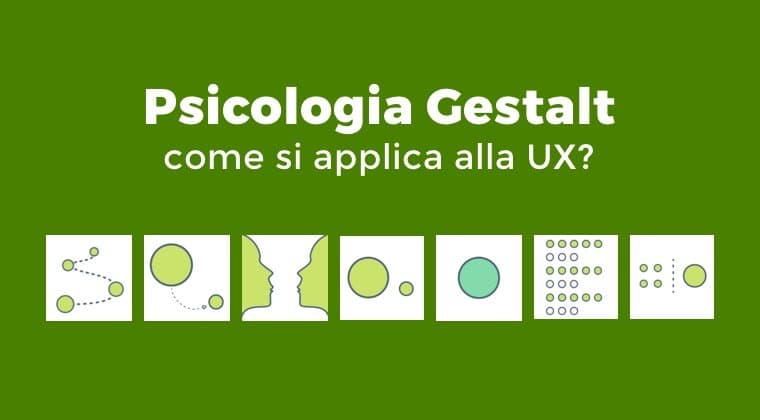
- The 7 core principles (proximity, similarity, closure, continuity, figure-ground, symmetry, common fate)
- Real-world examples of each principle in interfaces
- How to apply them deliberately in your designs
- The mistakes that happen when you ignore them
What Gestalt psychology is
The German word Gestalt means "form" or "configuration," but as an organic whole that is larger than the sum of its parts. The school of thought founded by Max Wertheimer, Wolfgang Köhler, and Kurt Koffka in the early 20th century argued that the human brain does not perceive isolated elements: it groups them automatically into patterns following predictable rules.
The classic motto: "The whole is different from the sum of its parts." When you look at a triangle drawn with three lines, you don't see three lines — you see a triangle. Your brain did the grouping work before you were even aware of it.
These perceptual mechanisms are universal and involuntary. That's why Gestalt rules apply to digital design as effectively as they applied to 20th-century graphic design: the biology of the human brain hasn't changed.
For a designer, knowing the Gestalt principles means being able to guide the user's perception intentionally, instead of relying on aesthetic intuition. It means having a vocabulary to explain why one composition works and another doesn't.
1. Law of proximity
Principle: elements placed near each other are perceived as part of the same group, even without explicit boundaries.
It's the most powerful and most used principle in interface design. Spatial grouping alone is enough to convey semantic relationship.
Practical example: in a contact form, first name and last name sit close together because they're related; email sits a bit further down, with a larger gap, because it's a different category. No boxes or separator lines needed: whitespace does all the work.
How to apply it:
- Move related elements closer
- Increase the space between different groups
- Don't add borders or lines if proximity is enough
- Use a spacing hierarchy: elements within the same group → related groups → different sections
Common violation: a page with the same spacing between every element. The brain doesn't know what goes with what and has to "decode" the structure instead of perceiving it.
2. Law of similarity
Principle: visually similar elements (by color, shape, size, orientation) are perceived as belonging to the same category.
Similarity is the main tool for creating visual hierarchies and categorization in an interface.
Practical example: in a design system, all primary buttons share the same brand color. All links share the same underline style. When the user sees a magenta button, they know "here's a primary action" without having to think about it. Similarity is an implicit communication channel.
How to apply it:
- Elements with the same function must be visually identical
- Use color as a categorical code (status tags, warning levels, content types)
- Differentiate roles with different shapes: rectangular buttons for actions, icons for shortcuts, chips for filters
Common violation: buttons that look alike but do different things. The user treats them as equivalent and then gets surprised by the consequences.
3. Law of closure
Principle: the brain automatically completes partial or interrupted shapes, "closing" them to form a recognizable pattern.
It's why you recognize a circle even when it's drawn with dashes, or a logo like IBM's (horizontal lines forming the letters) even when the characters are incomplete.
Practical example: many famous logos leverage closure. The WWF panda logo is drawn with black areas that the brain completes into a recognizable form. In interface design, minimalist icons work because the brain fills in the gaps: think of the "settings" gear icon — often stylized with just a few strokes, yet instantly recognizable.
How to apply it:
- Icons can be reduced to the essentials: the brain completes the rest
- Circular progress indicators work because the brain "sees" the full circle even when it's just an arc
- Minimalist illustrations are powerful because they require active engagement from the viewer
Common violation: cramming every space with detail for the sake of "clarity." An over-detailed icon is less recognizable than a stylized one, because it floods the brain with superfluous information.
4. Law of continuity
Principle: the brain prefers to interpret shapes as continuous, following lines and curves rather than abrupt breaks.
When you look at two lines that cross, you don't see four separate segments: you see two continuous lines that intersect.
Practical example: in a chart with two crossing data lines, the brain automatically follows the continuity of each line. That's why line charts are more readable than bar charts for showing trends over time: continuity is intrinsic.
Another example: a carousel of horizontally aligned images suggests "there's more to the right" even without an explicit arrow, precisely because the visual line continues off-screen.
How to apply it:
- Align elements on invisible grids to create lines of continuity
- Use grid layouts where the brain naturally follows rows and columns
- Lay out images in a carousel with a "peek" of the next item to suggest scrolling
Common violation: arbitrary breaks in a layout. Elements that look "eaten" by others create unpleasant visual discontinuities.
5. Law of figure-ground
Principle: the brain automatically separates elements into "figure" (the main object) and "ground" (the context). It can't perceive both simultaneously as foreground.
The classic "Rubin vase" illusion (where you alternately see a vase or two facial profiles) illustrates this principle perfectly.
Practical example: a modal dialog in the center of the screen with a darkened backdrop (semi-transparent overlay) applies this law: it makes the dialog unmistakable as "figure," and the background becomes passive. The user knows where to focus.
Another case: Duolingo's illustrations, where the green mascot stands out against a flat white or colored background. The figure is always clear because the background doesn't compete.
How to apply it:
- When you want to grab attention, create strong contrast between figure and ground
- Use dark overlays or blur to isolate a priority element
- In charts, clearly distinguish the data from the grid background
Common violation: busy images with detail upon detail where figure and ground compete. The eye doesn't know where to land and the composition feels confused.
6. Law of symmetry
Principle: the brain prefers symmetrical shapes as stable, balanced, and pleasing. Symmetry is a signal of order and intent.
Practical example: most professional interfaces use centered or symmetrical layouts to communicate seriousness and order. Login forms are almost always perfectly centered in the available space. Headers with a logo on the left and a menu on the right are a form of symmetry by counterweight.
How to apply it:
- Use symmetrical layouts to communicate trustworthiness (banks, healthcare, official documents)
- Use controlled asymmetry to create dynamism (landing pages, marketing pages)
- Balance the visual weight of elements even when they're not geometrically symmetrical
Common violation: accidental asymmetry that looks like an "alignment error" instead of an intentional choice. Asymmetry only works when it's recognizable as a decision.
7. Law of common fate
Principle: elements that move together (same direction, same speed) are perceived as part of the same group, even if they look different.
This principle was marginal in 20th-century static design but has become central to dynamic digital design.
Practical example: in a card carousel, when the cards all scroll together at the same speed, the brain perceives them as a single group (the "gallery"). If one card moves at a different speed, you perceive it as separate — that's the principle behind parallax effects.
In micro-interactions: a set of elements that appear with the same entrance animation are perceived as a group. If you want to differentiate hierarchy, give distinct animations to primary elements.
How to apply it:
- Use synchronized animations for related elements
- Use distinct animations for elements that need to feel separate
- In tab switches, animate transitions together to signal "this is an alternate view of the same object"
Common violation: chaotic animations where every element has its own timing, producing confusion instead of hierarchy.
How to apply Gestalt principles in your workflow
Three practical techniques to internalize the principles:
1. Squint review
Look at your designs with your eyes squinted. Without the details, you see the general structure: are the groups clear? Is the hierarchy recognizable? Is there a focal point? If the design looks chaotic when you squint, the Gestalt principles aren't doing their job.
2. Name the laws in design critiques
When giving feedback on a design, name the laws explicitly: "Proximity between these two groups is too weak here — the email field looks like it belongs to the 'submit' section instead of 'contacts'." Naming phenomena makes them actionable.
3. Build a mental archive of examples
Every time you see an interface that "works," ask yourself which Gestalt laws it's applying. Over time you'll build a mental catalog of patterns you can reuse.
Frequently asked questions
Are Gestalt principles the same as Nielsen's heuristics?
No, they're complementary. Nielsen's heuristics describe principles of interaction (feedback, consistency, error prevention). The Gestalt principles describe how visual perception works. A usable interface respects both.
How many Gestalt principles are there?
The original school listed about 6–7 major ones. Over the years others have been added (synchrony, common region, uniform connectedness), bringing the total to 10–12 depending on the author. The 7 laws covered in this article are the most relevant for digital design.
Can I violate a Gestalt principle intentionally?
Yes, to create specific effects. The art of design is knowing when to respect the rules and when to break them. A deliberate violation of a Gestalt principle can create visual tension, surprise, focus. An unconscious violation only produces confusion.
Do Gestalt principles apply to voice interfaces?
Indirectly. The Gestalt principles are visual, so they don't apply literally to audio. But cognitive analogues exist for hearing: grouping by timbre, rhythm, or pause — which guide the design of voice UIs.
How do I teach Gestalt principles to a beginner?
The best way is to have them identify the principles in existing interfaces. Take 5 screenshots of famous apps and ask the beginner to name which Gestalt principles are at work. The exercise is more effective than pure reading.
Next steps
Gestalt principles are a foundation of visual design. To go deeper:
- Study Nielsen's usability heuristics as a complement
- Read the guide to visual and UI design
- Dig into typography in UX Design
CorsoUX's Visual Design course includes hands-on exercises applying Gestalt principles to real projects, with mentor feedback.